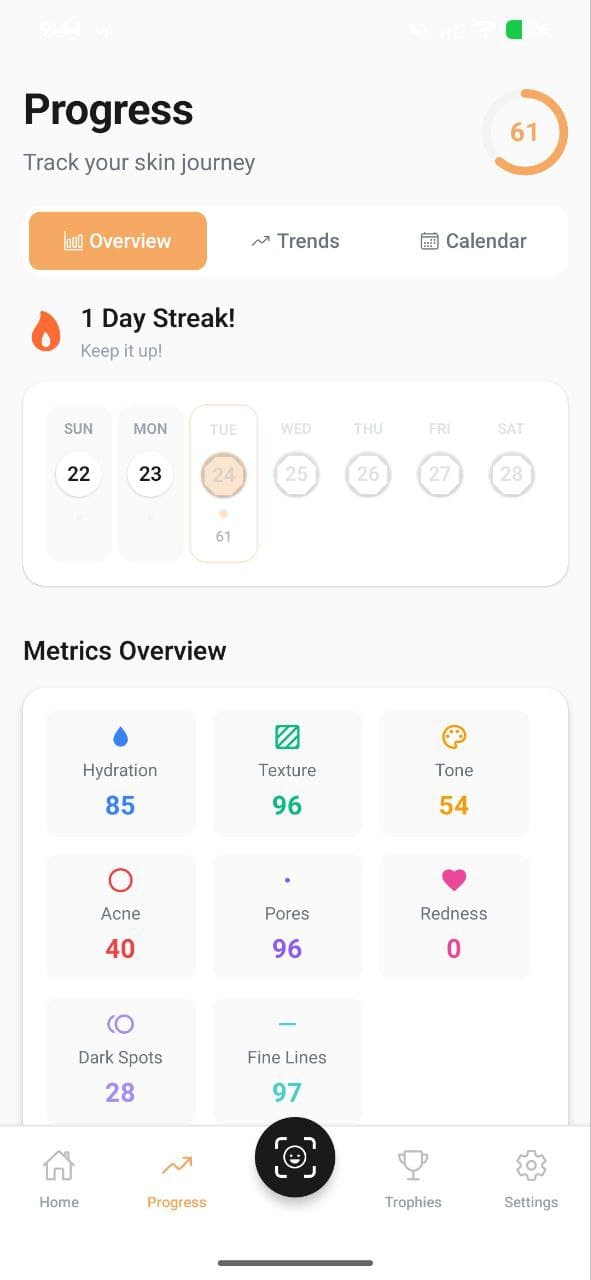
Consistency is the secret to great skin, and AISkincare's Progress Tracking and Scan Comparison features help you see exactly how your skin is improving over time.
The Progress Dashboard
Your Progress tab shows a visual overview of all six skin metrics over time. You can view trends by week, month, or all-time to see how each metric has changed.
The dashboard includes:
- Overall Skin Score — a combined score across all metrics
- Individual metric charts — see hydration, texture, tone, acne, pores, and redness trends
- Weekly averages — smoothed data to show real trends (not just daily fluctuations)
Scan Comparison
The Compare Scans feature lets you select two scans from different dates and view them side-by-side. This is incredibly useful for:
- Seeing visible improvements in texture or redness
- Checking whether a new product is helping or hurting
- Sharing progress with your dermatologist
Weekly Scan Calendar
Your home screen's scan calendar shows which days you've scanned, helping you stay consistent. Each day shows your scan score with color-coded indicators (green for good, yellow for average, red for areas needing attention).
Tips for Meaningful Progress Tracking
- Scan at the same time each day — morning scans before products give the most consistent baseline
- Wait at least 2 weeks before judging a new product's effectiveness
- Log symptoms in your Diary when something changes — this helps correlate events with metric changes
- Check your weekly reports for AI-generated insights about your progress
More from the Blog
Understanding Your 6 Skin Metrics: Hydration, Texture, Tone & More
AISkincare analyzes six key metrics every time you scan — Hydration, Texture, Tone, Acne, Pores, and Redness. Learn what each score means and how to improve them.
Quick Scan vs Full Scan: Which One Should You Use?
Learn the difference between Quick Scans and Full AI Scans, and when to use each for the best insights into your skin health.
Building Your Perfect Routine: AM, PM & Evening Slots
AISkincare's Routine Creator helps you organize your morning, afternoon, and evening skincare steps. Here's how to build a routine that works.